
How to Join an Online Dance Challenge
Ready to move from practicing to performing? Learn how online dance challenges work, what to prepare before posting a video, and how to find a competition in HILFE AI.
See HILFE AI entry steps ↓What is an online dance challenge?
Quick answer: An online dance challenge invites participants to learn or perform a routine, record a video and share it under an event’s rules. Some challenges are informal activities; others are competitions with entry conditions and rankings. Always check the specific event before submitting.
You do not need a professional studio to start. A smartphone, a safe place to move and a short routine are often enough for a first attempt. The goal is to participate confidently and follow the rules—not to make every move perfect.
Follow an event’s routine
Check whether the event asks for a particular video, song, choreography, time limit or theme.
Record a clear performance
Position your phone securely, keep your full body in frame if required, and use good lighting.
Check the entry rules
Review eligibility, deadlines, permitted content, video visibility and any regional restrictions.
Share when you are ready
A challenge can be a reason to practice consistently—even without a prize or a ranking.
How to join a dance competition in HILFE AI
HILFE AI’s published Dance Practice & Competition Guide describes a crown-icon entry flow. The sequence below follows that guide. Button names, available events and conditions may differ in the current app version.
Open HILFE AI and look for the crown icon
Start the app and locate the 👑 competition section from the home screen. If you do not see it, check the current navigation or event availability.
Choose an available competition
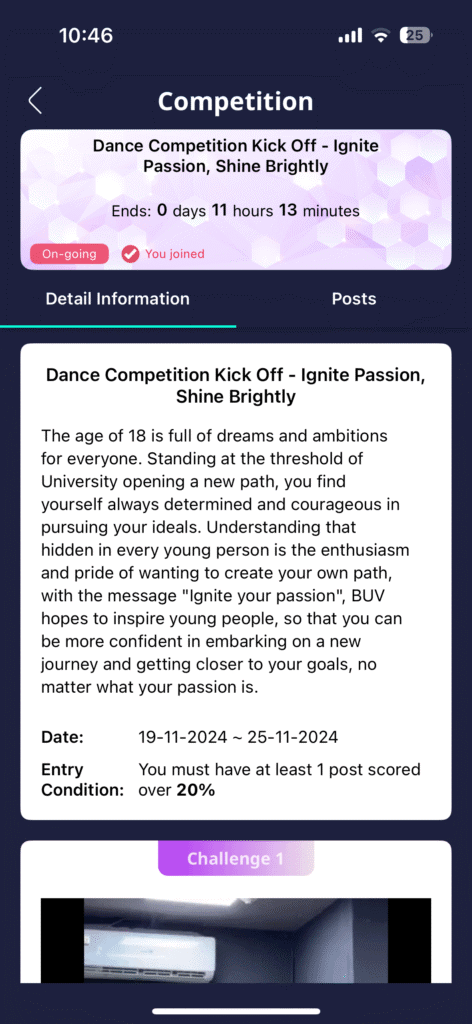
Open an event that interests you. Read its rules before committing: theme, eligibility, deadline and submission requirements may differ.
Complete the practice-video requirement
The published guide lists at least one previously posted AI-scored video as an entry requirement. Practice with a sample video, upload a performance for scoring and confirm that your post meets the current rules.
Tap “Join” when you are eligible
After reviewing the event details and preparing your performance, use the app’s Join action to register if it is available.
Upload your final performance video
Submit the recording requested by the event. Check for the app’s submission confirmation rather than assuming that tapping Join completes entry.
Challenge vs. competition: HILFE AI shows both challenge and competition experiences. This walkthrough covers the published competition entry flow; a particular challenge may have different steps or no ranking.

New to the practice workflow? Read AI Dance Coach for Beginners for help with sample videos and preparing an AI-scored performance before you enter.
Dance challenge video checklist: before you upload
A few simple checks can help your first video look clearer and reduce avoidable submission problems.
Match the event rules
Check the requested choreography, length, file format and deadline on the actual event page.
Check the frame
Keep the movements visible and avoid camera shake. Test a short clip before filming the full performance.
Practice safely
Use a clear, non-slip space. Choose movements that fit your room and ability, and stop if you feel pain or dizzy.
Protect your privacy
Review who can view your video and avoid sharing personal details in the background. Use music you are allowed to post.
If a video is declined or an entry does not appear, review the event rules and the confirmation screen first. A temporary upload or network problem may also require trying again.
How are AI dance scores and competition rankings different?
In HILFE AI, an AI practice score is intended to give feedback about a performance. A competition ranking may consider additional inputs, and it should not be treated as simply the AI score shown on your uploaded video.
What the published guide says: HILFE AI describes Accuracy, Rhythm and Expression in AI scoring, and notes that competition ranking can also reflect audience engagement such as likes (including paid likes) and comments. It does not publish a full weighting formula. Current event rules are the final reference.
Because audience participation may influence outcomes, a higher AI score does not necessarily mean a higher event position. Avoid making assumptions about rankings, prizes or eligibility without reading the current competition details.
For a deeper explanation of practice feedback—without mixing up scoring and ranking—see AI Dance Scoring Explained.
Frequently asked questions about online dance challenges
Can beginners join an online dance challenge?
Many online dance challenges welcome beginners, but eligibility is set by each event. Start with an accessible routine and check the actual event conditions before submitting.
How do I enter a HILFE AI dance competition?
According to the published guide, open the crown-icon competition area, select an event, meet the AI-scored-video prerequisite, tap Join and upload your final performance. Confirm the current instructions inside the app.
Do I need an AI-scored video first?
The HILFE AI guide says at least one AI-scored video must be posted before a competition entry. Requirements may change, so review the specific event page.
Is a dance challenge the same as a competition?
Not always. A challenge may simply invite participation, while a competition can include specific eligibility rules and rankings. Check the event label and conditions.
Does the highest AI score always win?
No such guarantee is given. HILFE AI’s public guide indicates that competition ranking can incorporate community engagement such as likes and comments in addition to AI scoring.
Is entering free, and can I win money?
HILFE AI is available to download, but participation conditions and any optional purchases, rewards or prizes depend on the current event and app terms. Do not assume a cash prize or a particular fee structure unless the event explicitly states it.
What if I cannot find the crown icon or Join button?
Check whether you are using the latest available app version, whether an event is open, and whether you meet its conditions. Menu labels and event availability can change.
Ready to try an online dance challenge?
Start with a short practice video, explore AI scoring, and see which challenges or competitions are currently available inside HILFE AI.


Free to download · Check your region, device compatibility and current event terms.
This guide is published by HILFE AI and describes the entry flow in its publicly available app guide. App screens, regional availability and competition rules may change. Always verify details inside the current app before posting a video.